Dj it! - Music Mixer
- 4.4
- Rating
- 10.00M
- Installs
- Free
- Price
 Analysis by App-foxy
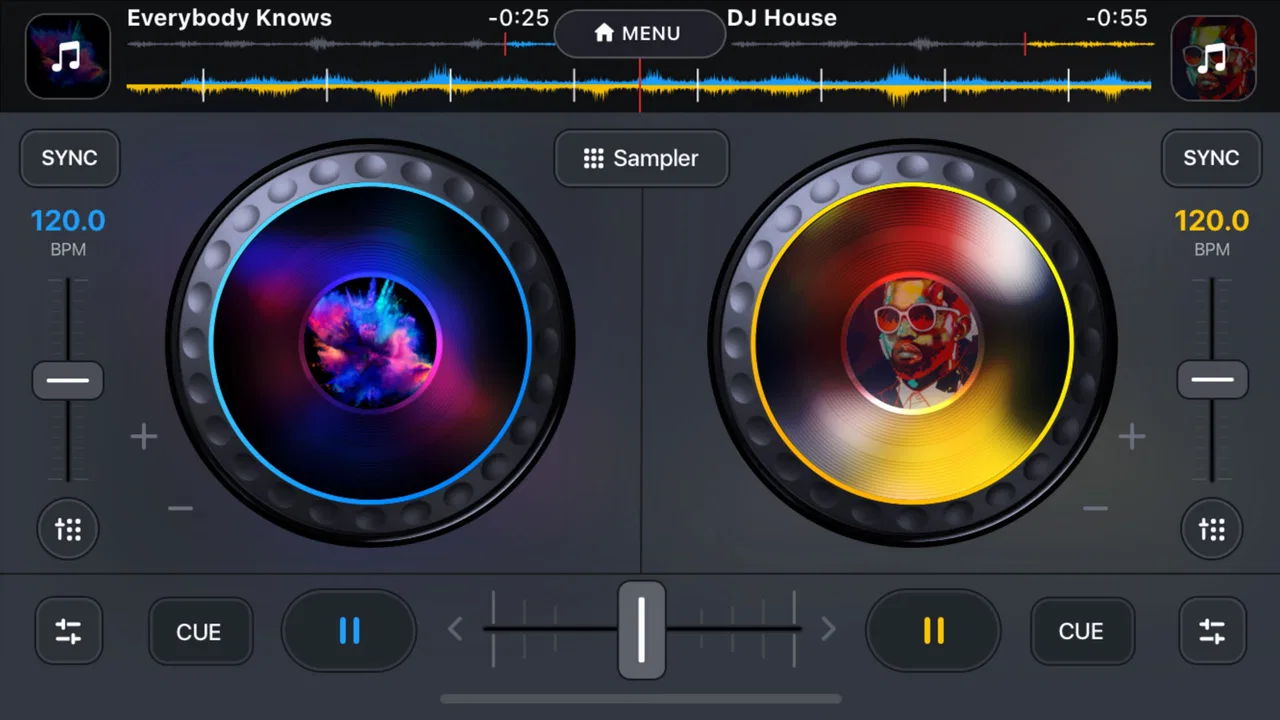
I approached Dj it! - Music Mixer as a quick, touch-friendly way to experiment with music rather than as a replacement for a full desktop DJ setup. It comes from Gismart and sits in the Music & Audio category, with a simple promise: let you mix tracks and build something of your own without first learning a complicated professional interface. After spending time with it, I think that focus is both its biggest strength and the reason some users may outgrow it.
The app is free to install and suitable for Everyone, which makes it easy to try casually. Its average rating is 4.4 from around 124 thousand ratings, and it has passed 10 million installs. Those figures suggest that it has found a broad audience, but they do not mean every user will have the same experience. A beginner looking for an enjoyable music toy may feel comfortable quickly, while someone expecting studio-level control may find the simplified approach restrictive.
Where the first session can go wrong
The most common frustration with a mobile music app is not necessarily the mixing itself. It is the moment when a user opens it, expects to start immediately, and is unsure what to tap first. Dj it! is designed around direct interaction, so the best way to approach it is to think in terms of a short session: choose something to work with, test the controls, make a small change, and listen back before attempting a more ambitious mix.
You May Also Like

 Blood Strike: 2.5 Anniversary
Blood Strike’s Loadouts Turn Every Drop Into a Tactical Gamble
A close look at Blood Strike’s custom loadouts: how fast access to signature weapons reshapes its battle royale rhythm, rewards preparation, and narrows the gap between fights.

 Pandora - Music & Podcasts
Pandora’s Music Is Easy to Start, but Harder to Recover
Pandora’s strength is its low-effort path from a seed to a station. Its weak spot is how much confidence it asks you to place in connection, setup, and quiet recovery.

 8 Ball Pool
 Is Built on Rivalries, Rematches, and Routine
A close look at the rivalries, rematches, shared routines, and unanswered safety questions that turn a quick pool match into a persistent mobile community.

 Samsung Music
’s Quiet Strength Is Playing What You Already Own
Its reach comes less from spectacle than from dependable access to a personal library. That simplicity is both the app’s strongest retention engine and its ceiling.

 AccuWeather: Weather Radar
AccuWeather Review: A Quick, Clear Forecast for Everyday Decisions
For everyday plans, the best forecast is the one you can understand quickly. AccuWeather makes rain timing, radar, and local conditions easy to act on, with a few trade-offs.

 Hill Climb Racing
Why Hill Climb Racing Still Turns Crashes Into One More Run
A tiny car, a bumpy hill and one more upgrade: Hill Climb Racing keeps resurfacing because its simple chaos makes every near-miss feel personal.
More From Our News Desk



I recommend beginning with a low-pressure experiment rather than trying to create a polished track immediately. Tap through the available mixing controls one at a time and listen for what each action changes. This matters because mobile controls can feel more dramatic than they look on screen. A small movement may alter the balance or character of the music enough to make the result seem messy, even though the original material is fine.
Another early stumbling block is trying to use too many controls at once. On a phone, it is easy to swipe, tap, and adjust several elements quickly, then lose track of which action caused an unwanted result. My practical rule is to change one thing, pause for a moment, and decide whether it helped. That habit makes the app feel much more predictable and gives you a clearer sense of how to recover when the mix starts sounding wrong.
The useful mindset is to treat every first mix as a sketch, not a performance. That removes much of the pressure. You can learn the layout, identify the controls you enjoy, and discover which combinations suit your taste before worrying about a finished result. For a casual app, this is a much more rewarding route than chasing a professional-sounding outcome from the first minute.
Why headphones make a difference
I would use headphones for any serious listening session. Phone speakers can hide changes in balance and make a mix seem acceptable when it is actually uneven. Headphones also help when you are working in a busy room, because outside sound can distract you from small transitions and make you compensate unnecessarily.
There is a trade-off here. Headphones make it easier to judge detail, but they can also encourage you to listen louder than necessary. I prefer a moderate volume and short checks through the phone speaker afterward. That second listen is valuable because the final audience may hear the result through ordinary speakers rather than the same headphones used during creation.
Setup checks before blaming the mixer
Before deciding that Dj it! is malfunctioning, I would check the basics. Make sure the device is running a supported operating system; the listed minimum is version 10. If the app opens but behaves strangely, close other demanding apps, restart the device, and try again with a stable connection if the current screen requires content to load. These are simple steps, but they separate a temporary device problem from a genuine issue inside the app.
It is also worth checking the phone’s sound output. Bluetooth headphones, wired headphones, a car system, and the built-in speaker can each create a different impression. If you hear no sound, first confirm that the volume is raised and that audio has not been routed to another connected device. If the sound is delayed, test with the phone’s own speaker or a wired listening option before assuming the controls are unresponsive.
Storage and background activity can affect any music app, especially when a phone is nearly full or busy synchronizing other content. I would leave some working room, close unnecessary apps, and reopen Dj it! before repeating the same action. This is not a special trick for this particular product; it is a sensible way to reduce variables when testing an interactive audio app.
The app is currently listed as version 1.31. If your installation behaves differently from what you see in current instructions or on another device, checking for an available update is a reasonable first step. I would avoid repeatedly reinstalling before trying the less disruptive checks, since a fresh installation does not automatically solve audio routing, device load, or account-related purchase confusion.
Understanding the free starting point
Because the app is free, it is accessible for a quick trial, but users should pay attention to the purchase prompts that appear during use. In-app purchases range from $7.99 to $49.99 per item. I would not make a purchase simply because a locked option interrupts the first session. Spend enough time with the free experience to decide whether the workflow itself suits you, then consider whether an optional upgrade genuinely improves the way you intend to use the app.
This is especially important for younger users. The age classification is Everyone, but purchase decisions still deserve adult supervision on a shared device. A suitable content rating does not mean that every paid choice will be suitable for every household budget. I would review the device’s purchase controls before handing the app to a child or allowing unsupervised experimentation.
Another useful setup habit is to decide what you want from the session before opening the mixer. If your goal is to play with rhythm and transitions for a few minutes, the free entry point may be enough. If you want a repeatable tool for frequent music-making, examine how comfortable the controls remain after several sessions rather than judging only by the excitement of the first launch.
Recovering a workflow when a mix goes wrong
When a mix begins to sound unpleasant, the fastest recovery is usually not to keep adding effects or making random adjustments. I step back mentally and return to the last change I understood. If one control caused the problem, reverse that action and listen again. If I cannot identify the cause, I reset my approach by stopping, reopening the session if necessary, and rebuilding from a simpler starting point.
This method is more reliable than trying to “fix” a confused mix through more movement. Mobile interfaces reward deliberate gestures. Rapid tapping can create a result that feels accidental, especially when you are listening through speakers with limited detail. A short pause between adjustments gives your ears time to register what happened and prevents a chain of guesses from becoming the new problem.
I also suggest making short practice passes. Work on one transition or one musical idea, listen to it, and then decide whether it is worth extending. This is a better workflow than attempting a long arrangement while still learning the interface. It gives you several small wins and makes it easier to identify whether the issue is timing, balance, a device delay, or simply a combination that does not sound good together.
A practical routine for casual sessions
Start with a quiet environment and choose headphones or the phone speaker deliberately rather than switching outputs halfway through.
Test the basic controls without trying to create a complete track. Listen for how quickly each action changes the sound.
Build a short section and stop before adding more. Use that pause to decide whether the mix is improving.
If the result becomes harsh or confusing, undo the most recent idea mentally by returning to a simpler combination instead of layering more changes.
Listen once through a different output before sharing the result or deciding that it is finished.
This routine reveals an important strength of the app: it can turn idle time into a small creative exercise. I can imagine using it while waiting for an appointment, relaxing at home, or showing a friend how basic remixing works. It is not necessary to plan a full production session, and that low commitment is part of its appeal.
When a saved or shared result does not behave as expected
If a result does not sound the same after leaving the app, first compare the listening setup. A mix can seem different because of the phone speaker, headphones, Bluetooth processing, or the volume level. I would play the same section again in the original environment before making changes. Otherwise, it is easy to alter a good mix in response to a playback difference.
If an action appears not to respond, repeat it more slowly and check whether the sound changes after a brief pause. Avoid tapping repeatedly in frustration, because that can produce several changes before you hear the first one. Closing and reopening the app is a sensible next step if the interface remains unresponsive, followed by a device restart if the problem affects other audio apps as well.
I would also keep expectations realistic about mobile sharing. A quick remix is easy to enjoy inside a casual workflow, but that does not automatically make the app a complete publishing environment. If your priority is detailed editing, precise arrangement, multitrack recording, or extensive export control, a dedicated digital audio workstation will generally be a better fit. Dj it! is strongest when the goal is immediate experimentation.
When the app is not the cause
Not every disappointing result comes from the software. The source material, the listening environment, and the device itself all influence what you hear. A combination may clash because its musical elements do not complement each other, not because the controls failed. Likewise, a mix that sounds thin through a small speaker may sound balanced through headphones.
Latency is another area where users can misdiagnose the problem. If a gesture and the sound seem slightly out of step, test a different output and close background apps before changing your technique. Wireless audio can introduce its own delay, so a wired option or the built-in speaker can help determine whether the timing issue follows the app or the connection.
There is also the possibility that the phone is under strain. If other apps are slow, audio cuts out elsewhere, or the device is unusually warm, I would treat the broader device condition as the first suspect. Restarting, freeing storage, and trying again later are more sensible than assuming the mixer has permanently damaged a session.
For account or purchase concerns, I would use the platform’s normal purchase-management tools and keep the app’s paid options separate from the creative question. The key decision is whether the mixing experience is enjoyable and useful before spending money. A purchase cannot fix a workflow that already feels too limited or unfamiliar.
Who will enjoy it most
I think Dj it! is a strong match for beginners, casual music fans, and anyone who wants a playful introduction to remixing. It is also useful for people who prefer learning through touch rather than reading a technical manual. A friend who has never used DJ software could open it and begin exploring without first understanding a professional mixer’s terminology.
It may appeal to someone who wants a creative break rather than a serious recording project. The short-session format is a genuine advantage: you can experiment, hear a result, and stop without committing an entire evening. It is also a reasonable choice for demonstrating basic ideas to a child or family member, provided an adult handles purchase supervision where appropriate.
I would skip it if you need exact control over every part of a production, a deep library-management system, detailed recording tools, or a workflow designed for live professional performance. In those situations, a desktop digital audio workstation or a more advanced DJ platform is the better alternative. Those tools are harder to learn, but their extra control matters when precision is more important than immediacy.
How it compares with familiar alternatives
Compared with a full desktop music workstation, Dj it! feels lighter and faster to approach. You give up depth in exchange for a friendlier first experience. Compared with simply playing songs in a standard music player, it offers an active role: you are shaping the listening session instead of only selecting tracks. Compared with professional DJ software, it is less intimidating but also less suitable for demanding preparation and performance work.
That middle position is where the app makes the most sense. It is more creative than passive listening and less demanding than production software. The trade-off is clear: if you want a quick way to explore mixing, the reduced complexity helps; if you already know exactly how you want to arrange and control a set, the same simplicity may feel limiting.
My practical verdict
After using it with a troubleshooting-first mindset, I see Dj it! - Music Mixer as an approachable mobile music playground rather than a complete professional studio. Gismart has aimed it at immediate interaction, and that makes it easy to recommend to someone who wants to try remixing without a long setup process.
The main advice I would give a new user is to start slowly, use headphones for careful checks, test another audio output when timing or volume seems wrong, and resist the urge to pile on adjustments. Those habits solve many of the frustrations that can otherwise look like app failures. They also make the creative side more enjoyable because you learn which changes are intentional.
The free installation lowers the barrier to trying it, while the in-app purchase range means I would explore first and decide later. The Everyone rating makes it broadly approachable, but responsible purchase settings still matter. With more than 10 million installs and a 4.4 average, it has clearly attracted a large audience, yet its real value depends on whether you want simplicity or depth.
I would recommend it to beginners and casual creators who want a quick, hands-on music experiment. I would point experienced producers toward a dedicated alternative when they need detailed editing or professional control. For everyone in between, the best test is simple: spend a few short sessions learning the workflow, check whether the controls feel natural, and judge the result through more than one listening setup. If that process feels fun rather than frustrating, this app can earn a regular place on your phone.
FAQs for Dj it! - Music Mixer
01What features does Dj it! - Music Mixer offer?
Dj it! - Music Mixer provides a range of features including real-time audio FX, crossfade, and a variety of loops and samples. It’s designed for both beginners and experienced DJs, offering tutorials and an intuitive interface. Users can mix tracks seamlessly and create professional-sounding mixes on their mobile devices.
02Is Dj it! - Music Mixer suitable for beginners?
Yes, Dj it! - Music Mixer is perfect for beginners. The app includes a user-friendly interface and step-by-step tutorials to help new users understand the basics of mixing. Its learning tools are designed to gradually build skills, making it an ideal choice for those new to DJing.
03Does Dj it! - Music Mixer require an internet connection?
While Dj it! - Music Mixer can be used offline for mixing saved tracks, some features such as downloading new samples or accessing tutorials may require an internet connection. Ensure you have access to the internet to fully utilize all the app’s features and updates.
04What devices are compatible with Dj it! - Music Mixer?
Dj it! - Music Mixer is compatible with most Android and iOS devices. It’s optimized for smartphones and tablets, ensuring smooth performance across different screen sizes. Users should check the app’s requirements on the respective app store to ensure compatibility with their device.
05Are there in-app purchases in Dj it! - Music Mixer?
Yes, Dj it! - Music Mixer offers in-app purchases. These may include additional sound packs, advanced features, or ad-free experiences. While the basic version is free, users can enhance their mixing experience by purchasing these optional upgrades. Pricing details are available within the app.
Pros
- User-friendly interface for beginners.
- Wide variety of effects and loops.
- Seamless integration with streaming services.
- High-quality sound output.
- Customizable playlists for easy access.
Cons
- Limited free features without subscription.
- Occasional lag on older devices.
- Ads can be intrusive in free version.
- Requires internet for most features.
- Advanced options need in-app purchases.

Dj it! - Music Mixer
Gallery